
Supabase Slim Mode: Disable Logflare & Save 1.5GB+ RAM — SupaScale Docker Guide
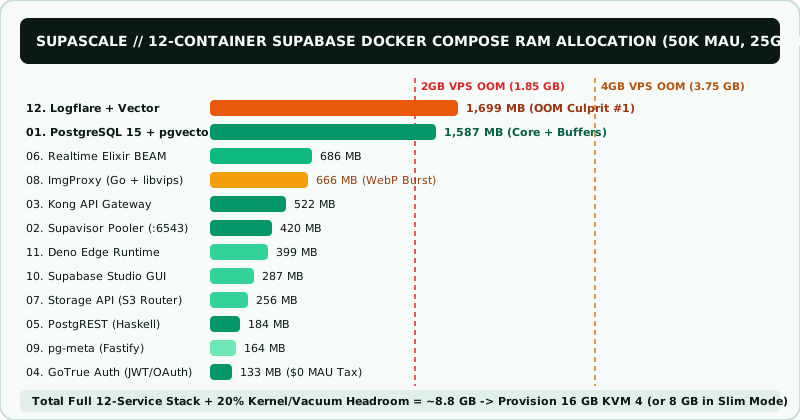
SupaScale demonstrates how unchecking tile #12 (Logflare + Vector) cuts idle Supabase Docker RAM by ~38% while keeping Postgres, Auth, REST, and Studio Table Editor intact.
SupaScale minimum floor: 4 GB RAM • Sweet-spot tier: 8 GB RAM (Public vendor rates retrieved 2026-11-12).
Running docker stop supabase-analytics manually fails on reboot if Studio or Kong still lists analytics under depends_on service_healthy! Compose will either hang waiting for port 4000 or respawn Logflare.
SupaScale Deterministic Memory Model Table: Supabase Slim Mode: Disable Logflare & Save 1.5GB+ RAM
| Supabase Docker Subsystem | Baseline Idle Reserve | 50K MAU Projected Reserve | Memory Role |
|---|---|---|---|
| Full 12-Service Compose Stack Baseline | 4.35 GB | 6.10 GB | OOMs 4GB VPS |
| Slim Mode (Logflare + Vector Unchecked) | 2.83 GB | 4.40 GB | -1.52 GB Saved! |
| Slim Core 7 (Also ImgProxy & Edge Off) | 1.93 GB | 3.05 GB | Fits 4GB–8GB KVM |
| Native Docker json-file + Dozzle Viewer | 18 MB | 24 MB | 98% Lighter |
SupaScale Slim Mode docker-compose.override.yml (Zero Logflare Overhead)
# Assign 'disabled' profile to analytics & vector so 'docker compose up -d' skips them:
services:
  analytics:
    profiles: ["disabled"]
  vector:
    profiles: ["disabled"]

  studio:
    environment:
      NEXT_PUBLIC_ENABLE_LOGS: "false"
    # Also remove analytics from studio.depends_on in base docker-compose.yml!

# Pair with native Docker JSON log rotation (/etc/docker/daemon.json):
# { "log-driver": "json-file", "log-opts": { "max-size": "25m", "max-file": "3" } }1. SupaScale Architecture Note: Why Self-Hosted Logflare Writes Back into Your Own Postgres
On managed Supabase Cloud, Logflare ships logs to an external BigQuery warehouse. In self-hosted Docker Compose, Vector scrapes container stdout streams and inserts them via Logflare right back into your primary PostgreSQL instance (_analytics schema)! In our SupaScale model, leaving Logflare enabled costs ~1.52 GB of BEAM + Rust RAM while adding continuous WAL write amplification.
2. Cleanly Decoupling Supabase Studio Healthchecks in the SupaScale Override
Assigning profiles: ["disabled"] to analytics and vector stops Docker Compose from starting them by default. Set NEXT_PUBLIC_ENABLE_LOGS="false" on the studio container and remove analytics from studio.depends_on so Supabase Studio boots cleanly in seconds.
3. SupaScale Lightweight Logging Alternative: JSON Rotation + 18 MB Dozzle
We recommend configuring native Docker json-file log rotation (max-size: 25m, max-file: 3) in /etc/docker/daemon.json so logs never exhaust NVMe storage, optionally paired with amir20/dozzle (an 18 MB Go container) behind basic auth.
SupaScale Matched KVM & VDS Tiers for Supabase Slim Mode: Disable Logflare & Save 1.5GB+ RAM
Hostinger KVM NVMe VPS (1-Click Docker / Coolify + Supabase) — SupaScale
From $4.99/mo (~127k)
12–24 mo KVM 2 (8GB) or KVM 4 (16GB) locks lowest rate + stacks Extra 20% partner discount.
Check Hostinger KVM VPS Specs for Supabase Slim Mode: Disable Logflare & Save 1.5GB+ RAM on SupaScale →Vultr High Frequency ($300 Free 30-Day Migration Credit) — SupaScale
From $6/mo (~153k)
Spin up a staging replica alongside Supabase Pro before flipping DNS in production.
Compare Vultr $300 Credit Options for Supabase Slim Mode: Disable Logflare & Save 1.5GB+ RAM on SupaScale →SupaScale rate citation: Public vendor tariffs retrieved 2026-11-12; promotional and renewal prices change — verify exact checkout pricing before ordering.